
Getting Started Using Development Tools
Every enemy runs a behaviour, which decides what it does. You can write your own in Lua, a small programming language that lots of games use. This page shows you how, with the Koopa as the example, and ends with everything a script can use.
The Script Window
You can write behaviours in any world you can edit. A behaviour belongs to its world, so any enemy in that world can run it, and when you change the script, every enemy running it changes too.
To write one, open the editor and click an enemy. At the top of the inspector, open the Behaviour list and choose Write one in Lua… at the bottom. The script window opens on a new behaviour that just walks its route. Press Apply and the enemy runs it. For an enemy that already runs one of the world's own behaviours, the Script button beside the list opens it. You can also press O for the map, where the panel lists the world's behaviours and has a Write one button.
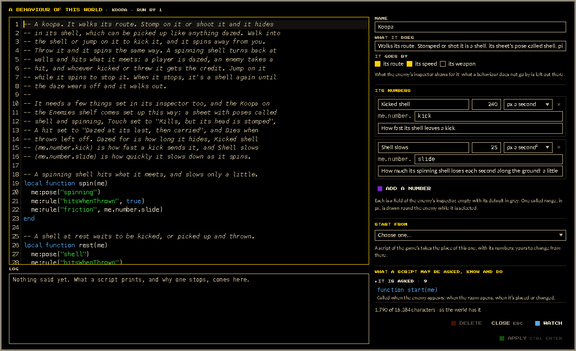
Your script is on the left, with its log underneath. On the right are the behaviour's name, a line about what it does, its numbers, Start from, and a list of everything a script can use. Click a line in that list to write it into your script.
Press Apply (or Ctrl+Enter) to send the script to the world, and every enemy running it starts again straight away. If Lua can't read the script, it isn't applied: the log says which line is wrong, and the old script keeps running. Watch moves the window into the corner so you can play while the script runs, and Script brings it back. If you close the window without applying, your changes are kept for next time, until you leave the editor.
You don't have to start from nothing. Start from has the game's own Koopa, Bomb thrower, Thwomp and Shy, the four behaviours in the inspector's list that are written in Lua. Pick one and it replaces what's in the window, numbers and all, and from then on it's yours to change: the game's own keeps running everywhere else as it was.
The Koopa, Step by Step
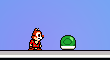
The Koopa starter makes an enemy behave like a koopa from Mario. It walks its route. Stomp on it or shoot it and it hides in its shell. Walk into the shell or jump on it to kick it, or pick it up and throw it, and it spins along the ground, turning back at walls and hitting whatever it meets. Jump on a spinning shell to stop it. When it stops, it's a shell again for a moment, then it walks out.
- Step 1: Set Up the Enemy
A script can change some of an enemy's rules, but it starts from what the inspector says, so set these first. The Koopa on the Enemies shelf comes set up like this already.
- Its picture
- needs poses called
shellandspinning. The game's own Koopa has both. For an enemy sheet you upload, name two of its poses that way in the sheet window. - Touch
- Kills, but its head is stomped
- A hit
- Dazed at its last, then carried
- Hit points
- 1, so the first stomp or shot puts it in its shell
- Dies when thrown
- off, so it lives through a throw
- Dazed for
- how long it hides in its shell
Leave Hits what it meets off and Friction as it is. The script changes both while the shell spins.
- Step 2: Give It the Script
Choose Write one in Lua… in its Behaviour list, pick Koopa from Start from, and press Apply. The enemy now runs the Koopa behaviour, and its inspector also shows the script's own numbers, Kicked shell and Shell slows. Here's the whole script:
-- A koopa. Stomped or shot it hides in its shell; walk into the shell
-- or jump on it to kick it, or throw it, and it spins along the ground.
-- It needs poses called shell and spinning, Touch "Kills, but its head
-- is stomped", A hit "Dazed at its last, then carried", and Dies when
-- thrown left off.

-- A spinning shell hits what it meets, and slows only a little.
local function spin(me)
  me:pose("spinning")
  me.hitsWhenThrown = true
  me.friction = me.number.slide
end

-- A shell at rest. A rule set to nil goes back to the inspector's.
local function rest(me)
  me:pose("shell")
  me.hitsWhenThrown = nil
  me.friction = nil
end

function dazed(me)
  rest(me)
end

-- A still shell is kicked away from whoever touches it; a spinning
-- one stops when they land on it.
function touched(me, side, above)
  if me.doing == "dazed" then
    spin(me)
    me:slide(-side * me.number.kick)
  elseif me.doing == "sliding" and above then
    me:daze()
  end
end

function thrown(me)
  spin(me)
end

-- Down after a throw or a kick it lies as a shell; after a fall it
-- walks on.
function landed(me)
  if me.doing == "dazed" then
    rest(me)
  end
end

function woke(me)
  me:pose()
end
Lines that start with
--are comments, notes for people that the game skips. The rest is made of functions. When something happens to the koopa, the game calls the function with that name and hands it the koopa asme. Here's what each one does.- A Spinning Shell
-- A spinning shell hits what it meets, and slows only a little.
local function spin(me)
  me:pose("spinning")
  me.hitsWhenThrown = true
  me.friction = me.number.slide
end
The script starts with two helpers of its own. A
local functionis one that only this script calls; the game never does.spinmakes the koopa a spinning shell.me:pose("spinning")shows the spinning pose.me.hitsWhenThrown = truemakes it hit whatever it meets, so a player it runs into is dazed and an enemy takes a hit.me.friction = me.number.slidesets how quickly it slows down to the Shell slows number, so it slides a long way. An enemy's rules are changed by setting them onmelike this, while it's alive.- A Still Shell
-- A shell at rest. A rule set to nil goes back to the inspector's. local function rest(me) me:pose("shell") me.hitsWhenThrown = nil me.friction = nil endrestmakes it a still shell again. It shows theshellpose and puts both rules back: a rule set tonilgoes back to what the inspector says.- When It's Stomped or Shot
function dazed(me)
  rest(me)
end
A stomp or a shot dazes the koopa, because A hit is set to daze it. The game calls
dazed, and the script makes it a still shell. A dazed enemy stays where it is and can be picked up, so the shell can already be carried and thrown.- When It's Touched
-- A still shell is kicked away from whoever touches it; a spinning
-- one stops when they land on it.
function touched(me, side, above)
  if me.doing == "dazed" then
    spin(me)
    me:slide(-side * me.number.kick)
  elseif me.doing == "sliding" and above then
    me:daze()
  end
end
When a player touches the koopa and isn't hurt, the game calls
touched.sideis1if they're on its right and-1if they're on its left, andaboveistrueif they came down on top of it.me.doingsays what the koopa is doing. If it's a still shell, the script kicks it:spinmakes it a spinning shell andme:slidesends it away from them at the Kicked shell speed. If it's already spinning and they landed on top,me:daze()stops it, and it lies there for its Dazed for time.- When It's Thrown
function thrown(me)
  spin(me)
end
When a player throws the shell, the game calls
thrownbefore it leaves their hands, so the rules set here decide how it goes.spinturns onhitsWhenThrown, which sends it spinning along the ground from the player's feet instead of over their head.- When It Stops
-- Down after a throw or a kick it lies as a shell; after a fall it
-- walks on.
function landed(me)
  if me.doing == "dazed" then
    rest(me)
  end
end
When the shell stops, the game calls
landed, andrestmakes it a still shell. It lies there for a second (longer if a jump stopped it), so it can be kicked or picked up again.- When It Wakes Up
function woke(me)
  me:pose()
end
When the daze wears off, the game calls
wokeand the koopa starts walking.me:pose()with nothing in the brackets hands the pose back to the game, so it shows its walk again.- Step 3: Try It
In the editor you're hovering, and enemies can't see or touch you. Press Tab to test, then stomp the koopa. Walk into the shell to kick it, or press Down beside it to pick it up and Down again to throw it.
Ideas to Try
Here are a few small changes to the Koopa script. Each one works in the game as it is.
- A Koopa That Takes Two Stomps
Set the koopa's Hit points to 2. Now the first hit takes a hit point, and only the second puts it in its shell. Add this
hitfunction to make the first stomp hurry it along, and replace the script'swokewith this one (a script can only have one function of each name):-- Stomped but not yet in its shell, it hurries. function hit(me, how) if how == "stomp" then me.speed = me.speed * 2 end end -- Awake, it walks out of its shell at its usual speed. function woke(me) me:pose() me.speed = nil endhitis called each time the koopa is hit and survives, andhowsays what hit it. Shots are left alone, so only a stomp makes it hurry. The newwokeputs its speed back to what the inspector says when it comes out of its shell.- A Koopa That Hurries When You're Near
Add this
thinkfunction:-- Called sixty times a second: hurry when somebody is near. function think(me) if me.player.distance < 150 then me.speed = 80 else me.speed = nil end endme.playeris the nearest player. When they're within 150 px, the koopa walks at 80 px a second, and when they move away it goes back to its own speed. If nobody's around,me.player.distanceis a huge number, so it never hurries for nobody. Try changing 150 and 80.- A Koopa That Complains
Set its Hit points to 2 again, and add this
hitfunction:-- Hit and not killed, it says so, and a knock is heard. function hit(me, how) me:say("Ouch!") me:sound("whack-1") endme:sayputs the words in a bubble over its head for a few seconds, andme:soundplays one of the game's sounds where it stands. Any sound in the inspector's lists works, by the id shown there.- Something Shy
Start a new behaviour for a Toad or any character instead, set its Touch to "Harmless: down kills it", and pick Shy under Start from. Here's the script you get:
-- Shy: goes about its route, and ducks while somebody is near. The -- pose is its own sheet's; any of the game's characters has one. local hiding = false function think(me) if me.doing ~= "walking" and me.doing ~= "standing" then return end local near = me.nearest local close = near.distance <= me.number.range if close and not hiding then hiding = true me:pose("ducking") me:stand(near.side) elseif hiding and not close then hiding = false me:pose() me:walk() elseif hiding and near.side ~= me.facing and math.abs(near.dx) > 8 then me:face(near.side) end endhidingis the script's own memory, one for each enemy running it.thinklooks at how far the nearest player is,me.nearest.distance, against its Range (90 px unless you change it). When they come that close it ducks, a pose of its own sheet by name, and stands facing them; when they've gone,me:pose()gives the pose back to the game and it walks on. Change"ducking"to any pose of its sheet, or make it say something withme:sayas it hides.
Everything a Script Can Use
This is the same list the script window shows beside your script, so it's always up to date. Times are in seconds, speeds in px a second, and positions in px, with y growing downward.
Events
Functions your script can write. The game calls each one when it happens and hands it the enemy as me. Write only the ones you need.
function start(me)- Called when the enemy appears: when the room opens, when it’s placed or changed, when its script is applied, and when it comes back after dying. Its variables start over each time.
function think(me)- Called sixty times a second while the enemy is alive, whatever it’s doing (
me.doingsays what), once it has faded in. A move it can’t make right now, like a walk while it’s carried, is skipped and the log says so; a pose, a rule and a shot still work. When a jump, charge or flight ends, it’s called on that same tick, so the next move follows straight on. function hit(me, how)- Called when it’s hit and isn’t killed.
howis"shot","stomp","thrown"when a thrown enemy hits it, or"blast"when a bomb goes off beside it. If the hit dazes it,dazedis called next. function touched(me, side, above)- Called when a player starts touching it and isn’t hurt: they walk into it while it’s dazed, sliding or harmless, or land on top of it.
sideis1if they’re on its right and-1if they’re on its left, andaboveistrueif they landed on top. It’s called once each time a touch starts. function dazed(me)- Called when a hit dazes it. It stays where it is, and a player can pick it up.
function woke(me)- Called when the daze wears off and it starts walking again.
function pickedUp(me)- Called when a player picks it up.
function thrown(me)- Called when a player throws it, unless it dies when thrown. The rules it has when this function ends decide how it goes: with
hitsWhenThrownon, it slides along the ground from the player’s feet and hits whatever it meets. Either way, itsfrictionslows it down on the ground. function landed(me)- Called when it comes down or comes to rest: at the end of a jump or a fall, when a throw or a slide stops, or when the player carrying it lets go.
me.doingsays how it ended up:"dazed"after a throw, a slide or being let go, lying there for a moment or as long asme:dazesaid untilwokeis called;"standing"after a jump;"walking"after a fall.
What It Knows
Read these from me. They're up to date each time a function is called, and changing them does nothing.
me.time- Seconds since the room opened.
me.x- Where its feet are from left to right, in px.
me.y- Where its feet are from top to bottom, in px.
ygets bigger going down. me.facing1when it faces right,-1when it faces left.me.doing- What it’s doing now:
"walking","standing","leaping","winding","dazed","carried","thrown","falling","sliding". A jump, a charge and a flight are all"leaping"."thrown"is flying from a player’s throw,"sliding"is sliding along the ground after a kick,me:slideor a throw withhitsWhenThrownon, and"falling"is dropping because its ground went from under it or it walked off an edge. me.since- When it started doing that, in seconds since the room opened.
me.elapsed- How long it’s been doing that, in seconds.
me.onGroundtruewhile it’s on the ground: walking, standing, winding up, lying dazed or sliding along it.falsein the air: jumping, flying, falling, thrown, or carried.me.hitPoints- How many hit points it has left.
me.player- The nearest living player, where the server last saw them.
xandyare their feet,dxanddyhow far right and down of its middle they are, anddistancehow far they are from it (0when touching).sideis1if they’re on its right and-1if they’re on its left.thereisfalsewhen nobody is around, and thendistanceismath.huge. A player hovering in the editor isn’t seen. me.nearest- The same player as
me.player, by its older name. me.ground- For one that keeps to its platform, on the ground: the stretch it can walk from where it is.
me.ground.fromandme.ground.toare its two ends,me.ground.aheadhow many px of it are left the way it faces, andme.ground.ledgeistrueif the end ahead is a drop rather than a wall or the end of its route.nilin the air, and for one that doesn’t keep to its platform. me.floor- The y of the ground under it, however far down: the first thing a player could stand on below its middle, a platform or a floor.
nilover nothing. For a Thwomp to drop to, or anything to fly down onto. me.number- Its behaviour’s own numbers as this enemy has them, by key, like
me.number.range. me.route- The two ends of its route,
me.route.fromandme.route.to, ornilif it has no route. me.width- How wide its box is, in px.
me.height- How tall its box is, in px.
me.weapon- The weapon it holds, or
nil.me.weapon.idis its id in the world’s armoury,me.weapon.ratehow many times a second a patrol would fire it,me.weapon.windUphow long it winds up in seconds, andme.weapon.rangehow far its bullets fly. me.flight- For an enemy with a flight,
me.flight.timeis how far into its loop it is andme.flight.lengthhow long the loop is, both in seconds. Otherwisenil. me.showing- The pose the script told it to show, or
nilwhile the game chooses. me.speed- How fast it walks, in px a second. Set it to change it while it’s alive:
me.speed = 80. Set it tonilto put it back to what the inspector says. Every rule goes back when it dies. me.touch- What touching it does right now:
"deadly","stompable"or"harmless". Set it to change it:me.touch = "harmless". me.onHit- What a hit does right now:
"damage"or"daze". Set it to change it. me.bulletProof- Whether shots pass through it right now. Set it to
trueorfalseto change it. me.hitsWhenThrown- Whether it slides along the ground when thrown and hits what it meets. A player it meets is dazed, and an enemy takes a hit. Set it to
trueorfalseto change it. me.friction- How quickly a slide along the ground slows down, in px a second lost each second. A high number stops it almost at once, and
0never slows it. Set it to change it. me.keepsToPlatform- Whether it keeps to its platform. If it does, it walks and charges along the ground it stands on, turns where the ground ends or something is in the way, lands a jump on whatever is below, and falls if its ground is taken away or a flight leaves it over nothing. Set it to
trueorfalseto change it. me.fallsOffEdges- Whether, keeping to its platform, it walks off a ledge instead of turning at it, like a Goomba. It still turns at a wall. Set it to
trueorfalseto change it.
What It Can Do
Call these on me with a colon, like me:walk(). An enemy only moves one way at a time, so if a function asks for two moves, the last one wins. A pose, a rule, a sound, words or fire happen alongside whatever it is doing. Its rules are set rather than called: me.speed = 80.
me:walk(facing)- Walks its route from where it is, the way it faces or the way given (
1or-1). With no route or no speed, it turns and stays put. If it keeps to its platform, it walks the ground it stands on, within its route. me:stand(facing)- Stands where it is, the way it faces or the way given.
me:turn()- Turns to face the other way and carries on walking or standing.
me:face(facing)- Turns to face that way (
1or-1) and carries on walking or standing. me:jump(up, along, gravity)- Jumps
uppx a second upward andalongpx a second sideways (left if negative,0if you leave it out), pulled back down bygravity(900if you leave it out). If it keeps to its platform, it lands on whatever is below, a box or a lower floor included, and a wall turns it back; otherwise it comes back down to the height it left from. It stands where it lands, andlandedis called. me:hop(along, up, gravity)- The same as
jump, withalongfirst: its older spelling. me:charge(speed, seconds)- Rushes along the ground at
speedpx a second (left if negative) for that many seconds, then stands where it stops. If it keeps to its platform, it stops at the end of the ground. me:fly(x, y, speed)- Flies in a straight line to the point at
speedpx a second, then stands there. It goes straight through anything in its way. me:swoop(x, y, speed)- Swoops through the point in an arc, the way a bat dives at you: down through it and up the other side to its own height, as far beyond the point as it was before it, setting off slowly, quickest through the dip, at
speedpx a second along the way on average. It goes straight through anything in its way and stands where it ends. A point straight under or over it is taken a little to the side it faces, so there is an arc. me:slide(speed)- Slides along the ground at
speedpx a second (left if negative), the way a thrown enemy slides: it falls off edges, turns back at walls, is slowed by itsfriction, and withhitsWhenThrownon it hits what it meets. It can start from a daze. A slide that answers a player’s touch or hit is theirs, so what it hits is credited to them and it never hits them.landedis called when it stops. me:daze(seconds)- Makes it lie dazed where it is for that many seconds, or for its Dazed for time if you leave it out, just as a hit does: it can’t hurt anyone, a player can pick it up, and
wokeis called when the daze wears off. A slide stops where it is, andlandedis called.dazedisn’t called, since your script already knows. me:shoot(weapon, x, y)- Stops, winds up, fires, then walks on. It fires the weapon it holds, or any weapon in the world’s armoury by its id, the way it faces or at the point given. Called again while it winds up, it aims the same shot again, so it fires at where the player is when the shot goes.
me:fire(weapon, x, y)- Fires straight away without stopping. The weapon and the aim work as they do for
shoot. Up to 16 shots fired in one go leave together, so a ring or a spread costs one change, not one each. me:die()- Kills it on the spot, as a hit would: it falls away and comes back later like any enemy. If the script is answering a player’s hit, touch or throw, the kill is credited to them.
me:sound(id)- Plays one of the game’s sounds where it is, by its id in
assets/sounds, like"smw-kick"or"halomonsterroar-1". Everyone near enough hears it. me:say(words)- Shows the words in a bubble over its head for a few seconds. They don’t go to the chat window.
me:pose(name)- Shows the pose of that name from its sheet until told otherwise.
me:pose()hands the choice back to the game. me:every(seconds, name)- Returns
trueonce every so many seconds andfalsein between: the first time it’s asked, and again each time that long has passed. For "fire every two seconds", writeif me:every(2) then me:shoot() endinthink. Give two timers of the same length different names to keep them apart. me:rule(name, value)- The long way to change one of its rules:
me:rule("speed", 80)does whatme.speed = 80does, andme:rule("speed")whatme.speed = nildoes. The rules are"touch","onHit","bulletProof","speed","hitsWhenThrown","friction","keepsToPlatform"and"fallsOffEdges".
Other Lua It Can Use
The parts of Lua that are safe to use. There's no string library and nothing that reads files or the clock, but you can still join text with .. and compare it.
print(...)- Writes a line to the log in the script window. Only people who can edit the world see it.
math.floor(n)- Lua’s math library:
abs,ceil,cos,floor,fmod,huge,max,min,pi,sin,sqrt,tointegerand the rest.math.randomworks too. pairs(t)- Goes through every key in a table and its value, in a
forloop. ipairs(t)- Goes through every item in a list in order, in a
forloop. next(t, key)- The key after this one in a table, and its value.
select(n, ...)- The values passed from the
nth one on.select("#", ...)counts them. type(v)- What kind of value it is:
"number","string","table","nil"and so on. tostring(v)- A value as text.
tonumber(v)- Text as a number, or
nilif it isn’t one. error(words)- Stops the script on purpose and shows your words in the log. The enemy patrols until it starts over: when its script or the enemy itself is changed, or the room opens again.
assert(v, words)- Stops the script, with your words in the log, if
visfalseornil.
Limits and Mistakes
The server runs every script, and these limits stop one world's scripts from slowing the game down for everyone.
- Script length
- 16,384 characters
- Behaviours
- 32 in a world, each with up to 16 numbers
- Each call
- 10,000 Lua instructions and 10 ms (a behaviour usually needs about 50 instructions)
- Memory
- 1 MB for all of a world's scripts together
- In one call
- 8 things done or printed, plus up to 16 shots, which leave together; anything more is skipped
- Each second
- 10 changes everyone sees from
thinkandstart, such as a move, a pose, a rule or a round of shots, and 30 more from the other events; anything more is skipped, and the log says so once - Printed lines
- 200 characters each; when scripts print a lot, the log shows the first few lines and counts the rest
If a script runs into an error, or goes over the instruction or memory limit, it stops. If the time limit cuts a call short before it has used half its instructions, the server may just have been busy, so that call is skipped with a line in the log, but 3 of those in a minute stop the script too. When a script stops, the enemy goes back to patrolling its route, and anything the script changed about it, like its pose or its rules, goes back to what the inspector says. It stays that way, even after it dies and comes back, until the script starts over. That happens when you apply a change to the script or change the enemy, or when the room opens again.
The log in the script window says why it stopped and on which line, and clicking that line in the log takes you to it in the script. While you're editing, the enemy shows script stopped over its head, and its inspector says what went wrong. Only people who can edit the world see any of this.
A script only ever sees the nearest player. It can't see the walls and platforms around it, apart from the ground under its own feet when it keeps to its platform, and it can't create new enemies. While you're hovering in the editor, enemies can't see you at all, so press Tab to test.
These are the mistakes people make most:
me.walk()- Use a colon,
me:walk(), whenever you tellmeto do something. me.hitPoints = 5- What
meknows is the game's, so setting it stops the script. Its rules are the exception:me.speed = 80is how a rule is changed. Keep anything else in a variable of your own. - A misspelled name
me.nearst.xstops the script with "attempt to index a nil value". In Lua, a name that doesn't exist isnil.- A missing
end - Lua can't read the script, so Apply is refused, the log says which line is wrong, and the old script keeps running.
- A loop that never ends
- The script stops with "it ran too long".
- A pose its sheet doesn't have
- Nothing breaks, but the game keeps choosing the pose.











